Who Sends These Messages
Messages are sent from Cadence, a self-hosted Mobile Integrated Health scheduling platform by EMStool. Cadence is used by EMS agencies and MIH programs to coordinate patient care appointments between field staff and coordinators.
SMS messages are sent only to registered Cadence users (staff members) when an appointment is added to their schedule by another user.
One Account, One Number — Per Customer
Cadence is multi-tenant: each customer agency runs on their own isolated subdomain (e.g. arc.emstool.com, scheduler.emstool.com) with its own database and its own SMS configuration. There is no shared phone number pooled across customers.
Practically, that means:
- Each subdomain/account registers and verifies its own dedicated phone number with the SMS provider.
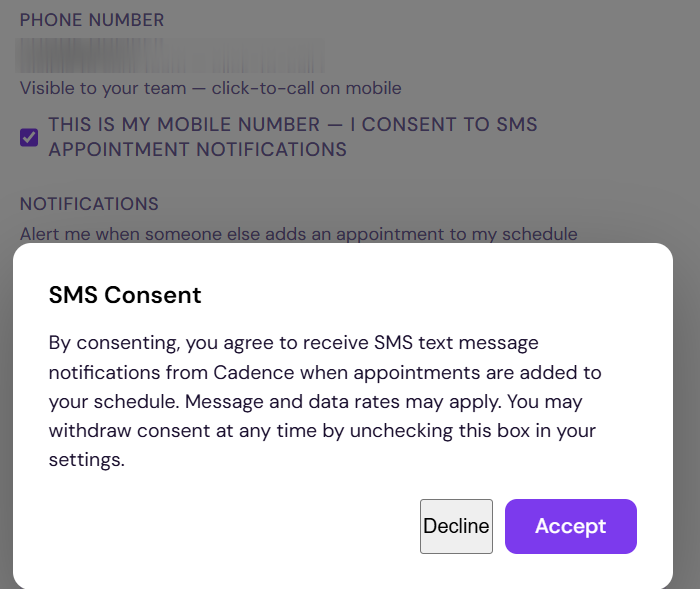
- Opt-in consent, collected per Step 1/Step 2 below, is scoped entirely to that one account — a user's consent on one agency's instance has no bearing on any other agency's instance.
- Message volume, recipient lists, and consent records are fully isolated per account. No cross-account message routing or shared infrastructure exists at the messaging layer.
- New customer accounts go through this same opt-in verification independently as they onboard — this page describes the opt-in mechanism itself, which is identical across every account since it's the same underlying Cadence codebase.
How Users Opt In
SMS notifications are strictly opt-in. Users must take two explicit steps inside the Cadence app before any SMS is sent:
Sample Messages
Only one message type is sent — a new appointment notification. No PHI (patient information) is included.
Message Frequency
One message per new appointment assignment. Users may receive multiple messages per day if multiple appointments are added to their schedule. Message frequency depends entirely on scheduling activity within their organization.
No Marketing Messages
Cadence SMS is used exclusively for transactional appointment notifications. No promotional, marketing, or bulk messages are sent. Messages are only triggered by a scheduler adding an appointment to a specific user's calendar.